> ## Documentation Index
> Fetch the complete documentation index at: https://dub-stripe-first-time-order-setting.mintlify.site/llms.txt
> Use this file to discover all available pages before exploring further.

# Offering dual-sided incentives

> Learn how to offer dual-sided incentives to your partners and the users they refer.

<Tip>
  This feature is only available on [Business plans and
  above](https://dub.co/pricing/partners).
</Tip>

With [Dub Partners](https://dub.co/partners), you can create dual-sided incentives for your affiliate/referral programs, which give special discounts to customers who sign up via a referral link.

<Frame>
  <video src="https://assets.dub.co/cms/dub-partners-dual-sided-incentives.mp4" loop autoPlay muted playsInline />
</Frame>

Some examples include:

* 25% discount for the first 12 months
* 30% lifetime discount
* \$50 one-off discount

This can drive powerful word-of-mouth growth as partners are more likely to share their link if it gives their audience/user base additional discounts, and on the other hand, their users are more likely to click on their links as well if they're getting a special deal.

In this article, we'll learn how to set up dual-sided incentives with Dub.

## Stripe coupons / promotion codes

There are two ways to set up dual-sided incentives if you're using Stripe:

### Option 1: Direct link-based discounts (recommended)

If you're using Stripe for payments, you can follow these steps to set up direct link-based discounts for your partner referral links:

<Note>
  Link-based discounts provide **better attribution accuracy** since you get
  visibility into the customer's geolocation, device info, referrer details, and
  UTM data.

  The trade-off here is that it requires some engineering work to set up.
</Note>

<Steps>
  <Step title="Create a discount on Dub">
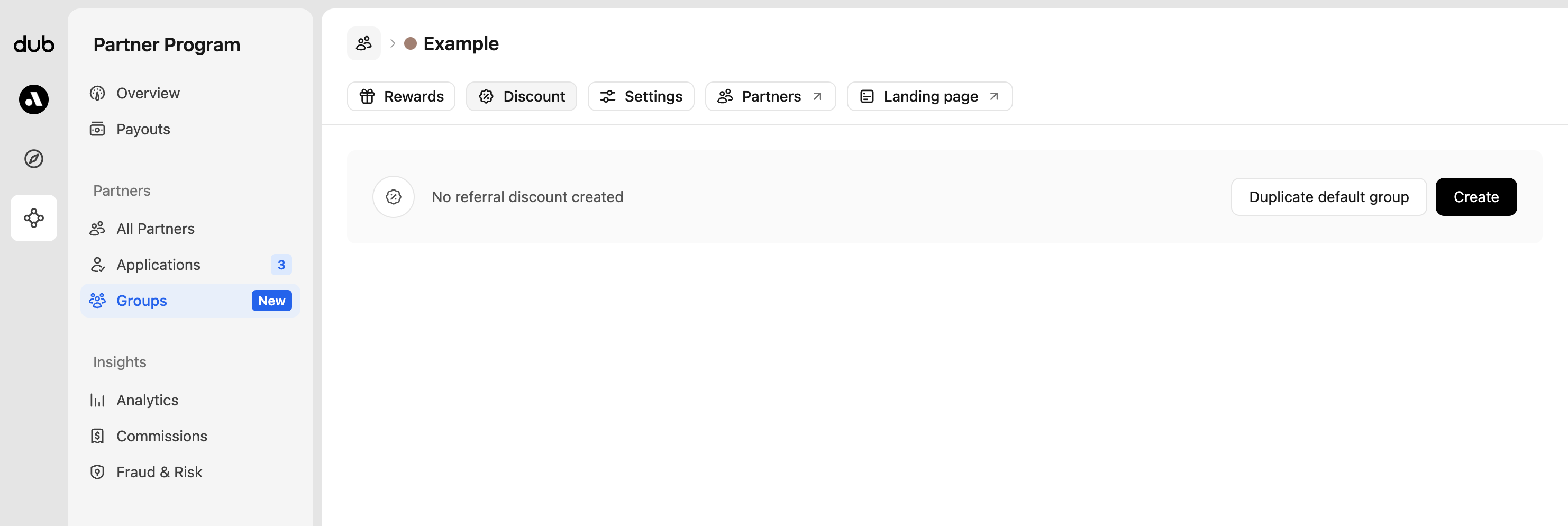
    First, navigate to the partner group that you want to create a discount for. Under the Discount tab, you'll be able to create a discount for the group

    <Frame>
      <img src="https://assets.dub.co/cms/group-discounts-empty.png" alt="Group discounts page" />
    </Frame>

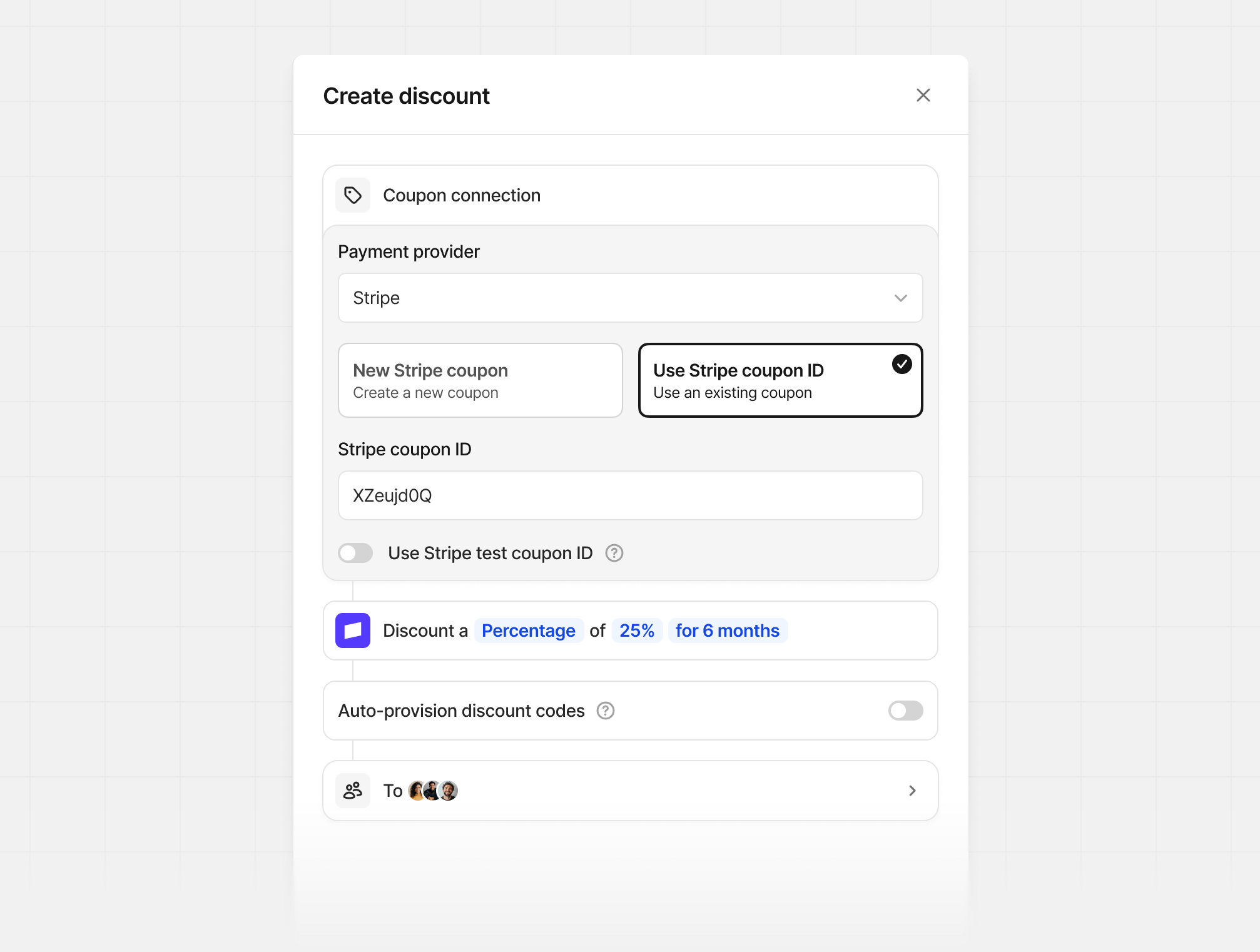
    If you already have a discount set up for your default group, you can just duplicate it. If not, click Create to create your first group discount:
    <Frame>
      <img src="https://mintcdn.com/dub-stripe-first-time-order-setting/qGSSqU2G1aKqFrUX/images/dub-partners/new-discount-reward.png?fit=max&auto=format&n=qGSSqU2G1aKqFrUX&q=85&s=2fe1b31da217d7dacbd0aa1b6b197a97" alt="Program discounts tab" width="2014" height="1522" data-path="images/dub-partners/new-discount-reward.png" />
    </Frame>

    **New Stripe coupon**

    If you don't have a coupon set up on Stripe yet, you can use the New Stripe coupon option to create a new coupon based on the discount type (percentage vs flat), amount, and duration set in Dub.

    **Use Stripe coupon ID**

    If you already have an existing coupon on Stripe, you can enter the Stripe coupon ID (should be an 8 alphanumeric code) under the Use Stripe coupon ID option.

    <Warning>
      Since Stripe doesn't support updating coupons after creation, you'd need to delete your discount in Dub and create a new one if you want to update any of the discount parameters.

      Note: Deleting a discount on Dub does not delete the corresponding Stripe coupon.
    </Warning>
  </Step>

  <Step title="Add coupon logic to checkout flow">
    The key to implementing link-based discounts is to check if a customer is eligible for a discount using Dub's [Customers API](/docs/api-reference/customers/list), then automatically apply the appropriate Stripe coupon to their checkout session.

    Here's how the flow works:

    1. When a user clicks a partner referral link, Dub tracks them as a potential customer
    2. During checkout, you query the Dub [Customers API](/docs/api-reference/customers/list) using the user's ID
    3. If they're eligible for a discount, you apply the coupon to their Stripe checkout session
    4. If not, you allow them to enter promotion codes manually

    <CodeGroup>
      ```ts TypeScript expandable theme={null}
      import { dub } from "@/lib/dub.ts";
      import Stripe from "stripe";

      const stripe = new Stripe(process.env.STRIPE_SECRET_KEY!);

      // Get customer discount eligibility from Dub
      const customers = await dub.customers.list({
        externalId: userId, // their user ID within your app
        includeExpandedFields: true,
      });

      const customerDiscount = customers.length > 0 ? customers[0].discount : null;

      // Create Stripe checkout session with conditional discount
      const stripeSession = await stripe.checkout.sessions.create({
        success_url: "https://app.domain.com/upgraded",
        cancel_url: "https://app.domain.com/pricing",
        line_items: [
          {
            price: "price_1MotwRLkdIwHu7ixYcPLm5uZ",
            quantity: 1,
          },
        ],
        mode: "subscription", // or "payment" for one-time purchases
        ...(customerDiscount
          ? {
              // Apply discount automatically if customer is eligible
              discounts: [
                {
                  coupon:
                    process.env.NODE_ENV !== "production" &&
                    customerDiscount.couponTestId
                      ? customerDiscount.couponTestId
                      : customerDiscount.couponId,
                },
              ],
            }
          : {
              // Allow manual promo code entry if no automatic discount
              allow_promotion_codes: true,
            }),
        customer_email: userEmail,
        metadata: {
          userId: userId,
          ...(customerDiscount && { dubDiscountId: customerDiscount.id }),
        },
      });
      ```

      ```python Python expandable theme={null}
      import stripe
      from dub import Dub
      import os

      stripe.api_key = os.environ.get("STRIPE_SECRET_KEY")
      dub_client = Dub(token=os.environ.get("DUB_API_KEY"))

      user_id = "user_123"  # the user's ID in your app

      # Get customer discount eligibility from Dub
      customers = dub_client.customers.list(
          email=None,
          external_id=user_id,
          include_expanded_fields=True
      )

      # Prepare checkout session parameters
      session_params = {
          "success_url": "https://app.domain.com/upgraded",
          "cancel_url": "https://app.domain.com/pricing",
          "line_items": [{"price": "price_1MotwRLkdIwHu7ixYcPLm5uZ", "quantity": 1}],
          "mode": "subscription",  # or "payment" for one-time purchases
          "customer_email": user_email,
          "metadata": {
              "userId": user_id,
          },
      }

      # Apply discount if customer is eligible
      if customers and hasattr(customers[0], "discount") and customers[0].discount and customers[0].discount.coupon_id:
          coupon_id = customers[0].discount.coupon_test_id if (
              os.environ.get("NODE_ENV") != "production"
          ) and hasattr(customers[0].discount, "coupon_test_id") else customers[0].discount.coupon_id

          session_params["discounts"] = [{"coupon": coupon_id}]
          session_params["metadata"]["dubDiscountId"] = customers[0].discount.id
      else:
          session_params["allow_promotion_codes"] = True

      # Create the checkout session
      session = stripe.checkout.Session.create(**session_params)
      ```

      ```ruby Ruby expandable theme={null}
      require 'stripe'
      require 'dub'

      # Initialize clients
      Stripe.api_key = ENV['STRIPE_SECRET_KEY']

      dub_client = ::OpenApiSDK::Dub.new
      dub_client.config_security(
        ::OpenApiSDK::Shared::Security.new(
          token: ENV['DUB_API_KEY'],
        )
      )

      # Get customer discount eligibility from Dub
      user_id = "user_123" # the user's ID in your app
      customers = dub_client.customers.list(
        ::OpenApiSDK::Operations::ListCustomersRequest.new(
          request: ::OpenApiSDK::Operations::ListCustomersRequestBody.new(
            external_id: user_id,
            include_expanded_fields: true
          )
        )
      )

      # Create checkout session parameters
      session_params = {
        success_url: 'https://app.domain.com/upgraded',
        cancel_url: 'https://app.domain.com/pricing',
        line_items: [
          {
            price: 'price_1MotwRLkdIwHu7ixYcPLm5uZ',
            quantity: 1,
          },
        ],
        mode: 'subscription', # or 'payment' for one-time purchases
        customer_email: user_email,
        metadata: {
          userId: user_id,
        },
      }

      # Apply discount if customer is eligible
      if customers.respond_to?(:customers) &&
        !customers.customers.empty? &&
        customers.customers[0].discount &&
        customers.customers[0].discount.coupon_id

        coupon_id = if ENV['NODE_ENV'] != 'production' &&
                      customers.customers[0].discount.coupon_test_id
                      customers.customers[0].discount.coupon_test_id
                    else
                      customers.customers[0].discount.coupon_id
                    end

        session_params[:discounts] = [{ coupon: coupon_id }]
        session_params[:metadata][:dubDiscountId] = customers.customers[0].discount.id
      else
        session_params[:allow_promotion_codes] = true
      end

      # Create the checkout session
      session = Stripe::Checkout::Session.create(session_params)
      ```

      ```go Go expandable theme={null}
      package main

      import (
          "context"
          "os"

          "github.com/stripe/stripe-go/v72"
          "github.com/stripe/stripe-go/v72/checkout/session"
          "github.com/dubinc/go-sdk/dub"
          "github.com/dubinc/go-sdk/operations"
      )

      func main() {
          // Initialize clients
          stripe.Key = os.Getenv("STRIPE_SECRET_KEY")

          dubClient := dub.New(
              dub.WithSecurity(os.Getenv("DUB_API_KEY")),
          )

          // Get customer discount eligibility from Dub
          userId := "user_123" // the user's ID in your app
          ctx := context.Background()

          listRequest := operations.ListCustomersRequest{
              Request: &operations.ListCustomersRequestBody{
                  ExternalId: &userId,
                  IncludeExpandedFields: true,
              },
          }

          customers, err := dubClient.Customers.List(ctx, listRequest)
          if err != nil {
              // Handle error
              return
          }

          // Create checkout session parameters
          params := &stripe.CheckoutSessionParams{
              SuccessURL: stripe.String("https://app.domain.com/upgraded"),
              CancelURL:  stripe.String("https://app.domain.com/pricing"),
              LineItems: []*stripe.CheckoutSessionLineItemParams{
                  {
                      Price:    stripe.String("price_1MotwRLkdIwHu7ixYcPLm5uZ"),
                      Quantity: stripe.Int64(1),
                  },
              },
              Mode:          stripe.String(string(stripe.CheckoutSessionModeSubscription)),
              CustomerEmail: stripe.String(userEmail),
          }

          // Add metadata
          params.AddMetadata("userId", userId)

          // Apply discount if customer is eligible
          if len(customers.Customers) > 0 && customers.Customers[0].Discount != nil && customers.Customers[0].Discount.CouponId != nil {
              var couponId string
              if os.Getenv("NODE_ENV") != "production" && customers.Customers[0].Discount.CouponTestId != nil {
                  couponId = *customers.Customers[0].Discount.CouponTestId
              } else {
                  couponId = *customers.Customers[0].Discount.CouponId
              }

              params.Discounts = []*stripe.CheckoutSessionDiscountParams{
                  {
                      Coupon: stripe.String(couponId),
                  },
              }
              params.AddMetadata("dubDiscountId", *customers.Customers[0].Discount.Id)
          } else {
              params.AllowPromotionCodes = stripe.Bool(true)
          }

          // Create the checkout session
          s, err := session.New(params)
          if err != nil {
              // Handle error
              return
          }
      }
      ```
    </CodeGroup>

    Once this is set up, eligible customers will automatically see the coupon code applied at checkout:

    <Frame>
      <img src="https://assets.dub.co/cms/stripe-coupon-applied.png" alt="Stripe coupon applied" />
    </Frame>
  </Step>
</Steps>

### Option 2: Using Stripe promo codes (no code required)

If you prefer a no-code solution, you can set up Stripe promo-code-based discounts for your partners.

<Note>
  Stripe promo-code-based discounts is much easier to set up (no code required).

  However, you do sacrifice on attribution accuracy since you won't have any
  insights into the customer's geolocation, device info, referrer details, and
  UTM data. Our Stripe integration will try to derive the customer's location
  based on their Stripe billing address, but it can sometimes be inaccurate.
</Note>

<Steps>
  <Step title="Create a discount on Dub">
    First, navigate to the partner group that you want to create a discount for. Under the Discount tab, you'll be able to create a discount for the group

    <Frame>
      <img src="https://assets.dub.co/cms/group-discounts-empty.png" alt="Group discounts page" />
    </Frame>

    If you already have a discount set up for your default group, you can just duplicate it. If not, click Create to create your first group discount:

    <Frame>
      <img src="https://mintcdn.com/dub-stripe-first-time-order-setting/qGSSqU2G1aKqFrUX/images/dub-partners/new-discount-reward.png?fit=max&auto=format&n=qGSSqU2G1aKqFrUX&q=85&s=2fe1b31da217d7dacbd0aa1b6b197a97" alt="Program discounts tab" width="2014" height="1522" data-path="images/dub-partners/new-discount-reward.png" />
    </Frame>

    **New Stripe coupon**

    If you don't have a coupon set up on Stripe yet, you can use the New Stripe coupon option to create a new coupon based on the discount type (percentage vs flat), amount, and duration set in Dub.

    **Use Stripe coupon ID**

    If you already have an existing coupon on Stripe, you can enter the Stripe coupon ID (should be an 8 alphanumeric code) under the Use Stripe coupon ID option.

    <Warning>
      Since Stripe doesn't support updating coupons after creation, you'd need to delete your discount in Dub and create a new one if you want to update any of the discount parameters.

      Note: Deleting a discount on Dub does not delete the corresponding Stripe coupon.
    </Warning>
  </Step>

  <Step title="Create your partner code">
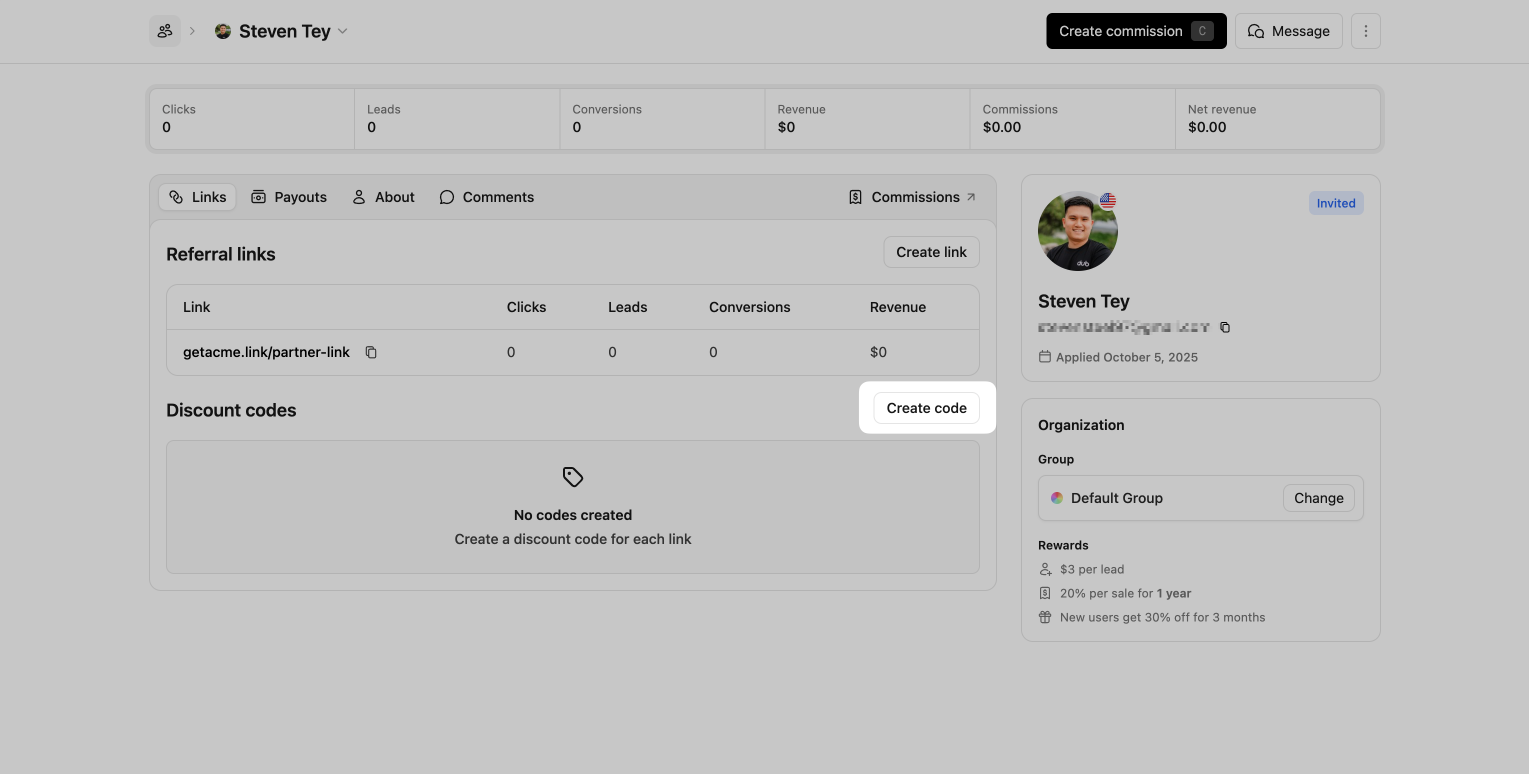
    Open the partner profile that you'd like to create a discount code for, then click Create Code in the "Discount codes" section.

    <Frame>
      <img src="https://assets.dub.co/cms/partner-create-code.png" alt="Partner links page" />
    </Frame>

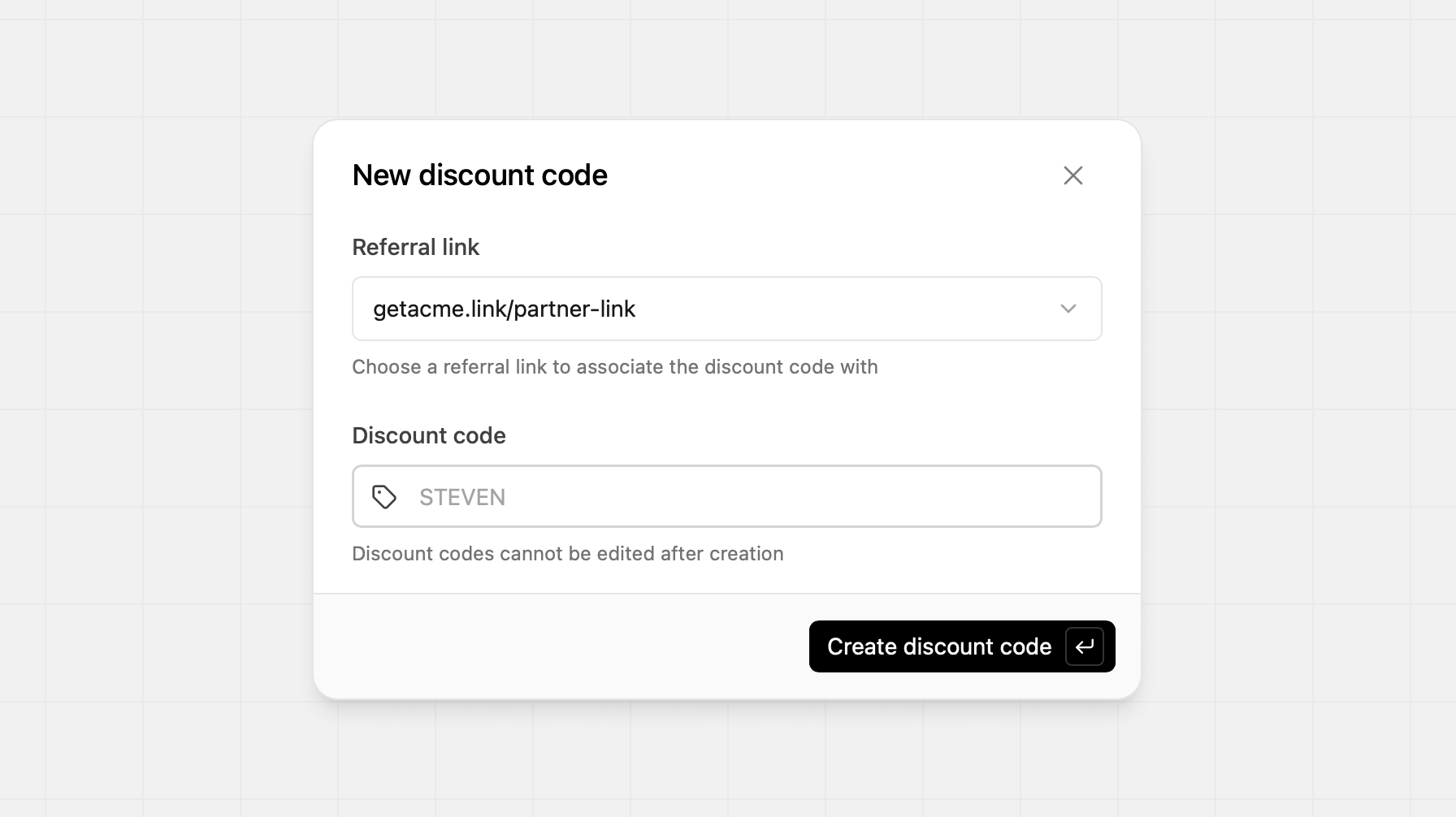
    Here you can select which referral link you'd like to associate the code with. Then you can create the discount code.
    <Frame>
      <img src="https://assets.dub.co/cms/new-discount-code.png" alt="Partner links page" />
    </Frame>

    <Warning>
      Discount codes cannot be edited after creation, so ensure that you have
      everything correct before creating the code
    </Warning>

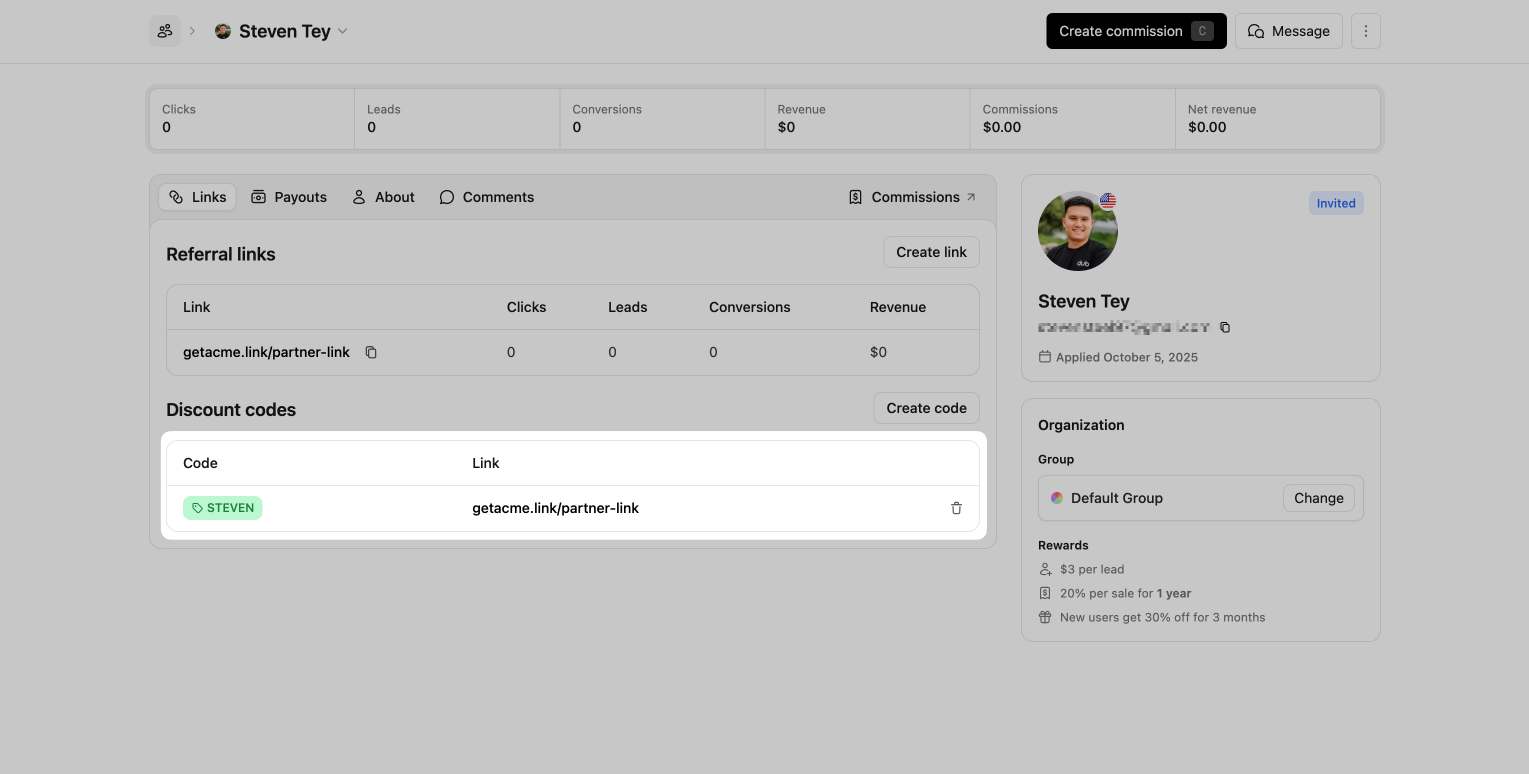
    After the code has been created, you'll see its value populated in the Discount Code section, and it is ready for use. In the Partner Dashboard, they'll also see the associated discount code within their partner links.

    <Frame>
      <img src="https://assets.dub.co/cms/partner-code-created.png" alt="Partner links page with discount code" />
    </Frame>
  </Step>
</Steps>

## Shopify discount codes

Use the **Shopify** discount provider when you sell through Shopify. Dub creates partner discount codes in your store automatically, and attributes the sale when a customer applies a partner's code at checkout — even if they didn't click a referral link.

<Note>
  This requires the [Dub Shopify app](/docs/integrations/shopify). Dub creates
  and deletes discount codes in your Shopify store automatically.
</Note>

<Steps>
  <Step title="Connect the Dub Shopify app">
    Install the [Dub Shopify App](https://d.to/shopify/app) and connect it to your Dub workspace. Follow the [Shopify integration guide](/docs/integrations/shopify) if you haven't already.

    <Frame>
      <img src="https://mintcdn.com/dub-stripe-first-time-order-setting/Khr99FWKCdrugDWp/images/shopify/shopify-app.png?fit=max&auto=format&n=Khr99FWKCdrugDWp&q=85&s=c1c5d8bfaba837dd6b6d2a2f32fee74b" alt="The Dub Shopify app" width="2462" height="1470" data-path="images/shopify/shopify-app.png" />
    </Frame>

    The app needs permission to create discount codes (`write_discounts`). If you installed it before this permission was added, reinstall or upgrade the app from the [Shopify App Store](https://apps.shopify.com/dub-conversion-tracking).
  </Step>

  <Step title="Create a Shopify discount on Dub">
    First, navigate to the partner group that you want to create a discount for. Under the Discount tab, you'll be able to create a discount for the group.

    <Frame>
      <img src="https://assets.dub.co/cms/group-discounts-empty.png" alt="Group discounts page" />
    </Frame>

    If you already have a discount set up for your default group, you can just duplicate it. If not, click **Create** to create your first group discount:

    <Frame>
      <img src="https://mintcdn.com/dub-stripe-first-time-order-setting/gLXC4XufHe-S3Ieh/images/dub-partners/create-shopify-discount.png?fit=max&auto=format&n=gLXC4XufHe-S3Ieh&q=85&s=98714a7aad3da1d7c25d03c0d47d4205" alt="Program discounts tab" width="2000" height="1160" data-path="images/dub-partners/create-shopify-discount.png" />
    </Frame>

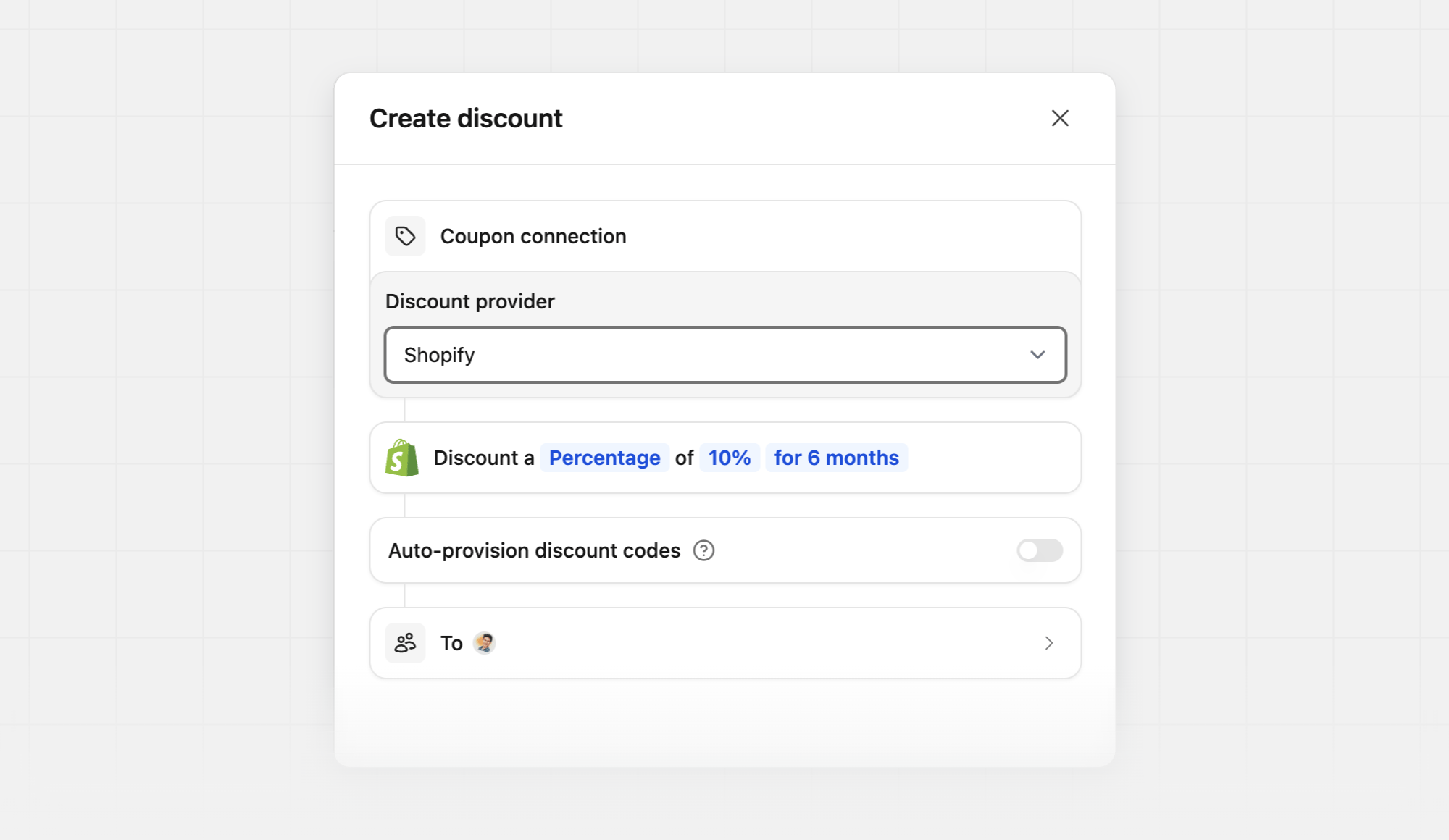
    Set **Discount provider** to **Shopify**, then choose the discount type (percentage vs flat), amount, and duration.
    <Warning>
      Since discount conditions can't be updated after creation, you'd need to delete your discount in Dub and create a new one if you want to change the type, amount, or duration.

      Deleting a discount or discount code on Dub also disables the corresponding codes in Shopify.
    </Warning>
  </Step>

  <Step title="Create partner discount codes">
    Open the partner profile that you'd like to create a discount code for, then click **Create Code** in the Discount codes section.

    <Frame>
      <img src="https://assets.dub.co/cms/partner-create-code.png" alt="Partner links page" />
    </Frame>

    Select which referral link you'd like to associate the code with, then create the discount code. If you omit a custom code, Dub generates one from the partner's name.

    <Frame>
      <img src="https://assets.dub.co/cms/new-discount-code.png" alt="Partner links page" />
    </Frame>

    Dub immediately creates a matching code in your Shopify store. Shopify codes created by Dub:

    * Apply to all products
    * Can be used once per customer
    * Work on one-time purchases and subscriptions
    * Use your discount duration as Shopify subscription billing cycles (one-time → first cycle, a set number of months → that many cycles, lifetime → applies indefinitely)

    <Warning>
      Discount codes cannot be edited after creation, so ensure that you have
      everything correct before creating the code.
    </Warning>

    After the code has been created, you'll see its value populated in the Discount Code section, and it is ready for use. In the Partner Dashboard, they'll also see the associated discount code within their partner links.

    <Frame>
      <img src="https://assets.dub.co/cms/partner-code-created.png" alt="Partner links page with discount code" />
    </Frame>
  </Step>
</Steps>

## Custom discount provider

Use the **Custom** discount provider when you manage promo codes in your own system (eg: WooCommerce, Squarespace, etc.) instead of Stripe or Shopify. Dub remains the source of truth for partner discounts and discount codes; your application creates and disables the matching codes by listening to webhooks.

<Steps>
  <Step title="Create a custom discount on Dub">
    First, navigate to the partner group that you want to create a discount for. Under the Discount tab, you'll be able to create a discount for the group.

    <Frame>
      <img src="https://assets.dub.co/cms/group-discounts-empty.png" alt="Group discounts page" />
    </Frame>

    If you already have a discount set up for your default group, you can just duplicate it. If not, click **Create** to create your first group discount:

    <Frame>
      <img src="https://mintcdn.com/dub-stripe-first-time-order-setting/gLXC4XufHe-S3Ieh/images/dub-partners/create-custom-discount.png?fit=max&auto=format&n=gLXC4XufHe-S3Ieh&q=85&s=4e13817ac8897da72507803bcf592615" alt="Program discounts tab" width="2000" height="1228" data-path="images/dub-partners/create-custom-discount.png" />
    </Frame>

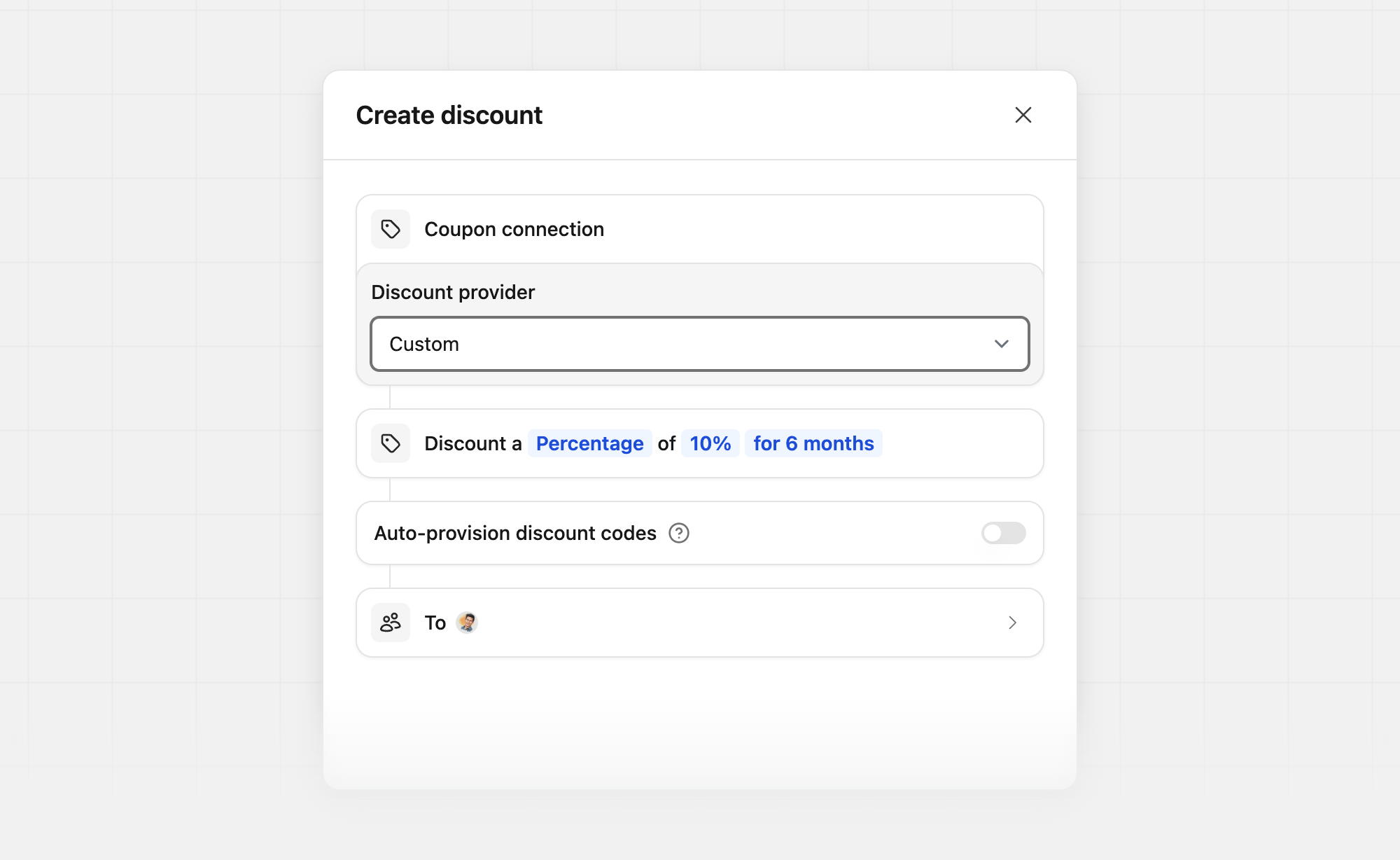
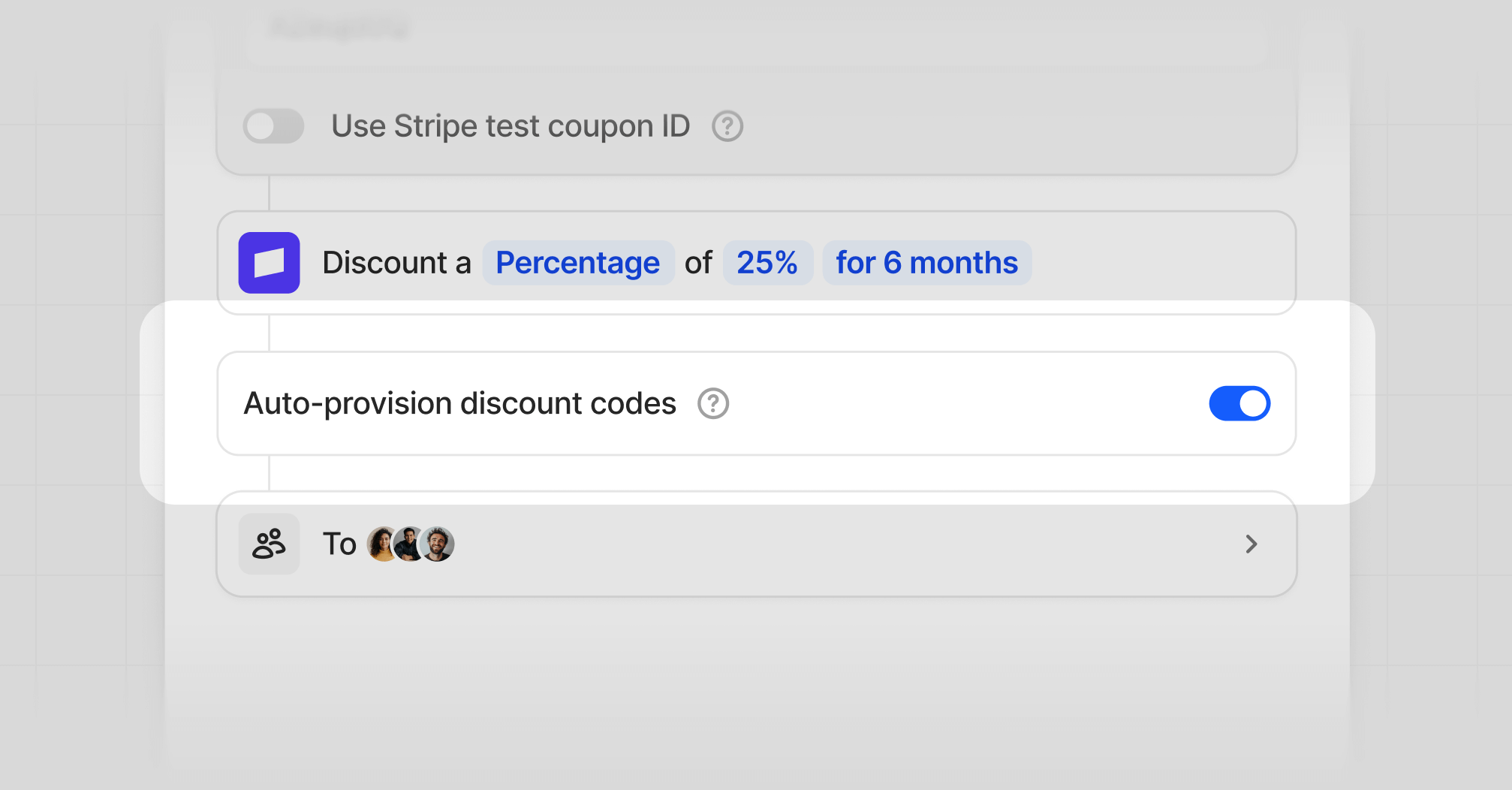
    Set **Discount provider** to **Custom**, then choose the discount type (percentage vs flat), amount, and duration.
    <Warning>
      Since discount conditions can't be updated after creation, you'd need to delete your discount in Dub and create a new one if you want to change the type, amount, or duration.
    </Warning>
  </Step>

  <Step title="Create partner discount codes">
    Open the partner profile that you'd like to create a discount code for, then click **Create Code** in the Discount codes section.

    <Frame>
      <img src="https://assets.dub.co/cms/partner-create-code.png" alt="Partner links page" />
    </Frame>

    Select which referral link you'd like to associate the code with, then create the discount code. If you omit a custom code, Dub generates one from the partner's name.

    <Frame>
      <img src="https://assets.dub.co/cms/new-discount-code.png" alt="Partner links page" />
    </Frame>

    <Tip>
      You can also [create](/docs/api-reference/discount-codes/create) or
      [delete](/docs/api-reference/discount-codes/delete) discount codes via the
      API.
    </Tip>

    <Warning>
      Discount codes cannot be edited after creation, so ensure that you have
      everything correct before creating the code.
    </Warning>
  </Step>

  <Step title="Sync codes with your system">
    Create a [webhook](/docs/webhooks/introduction) subscribed to [`discount_code.created`](/docs/webhooks/events/discount-code-created) and [`discount_code.deleted`](/docs/webhooks/events/discount-code-deleted).

    Your endpoint should:

    1. [Verify the webhook signature](/docs/webhooks/verify-webhook-requests)
    2. On `discount_code.created`, create the matching promo code in your system using `data.code` and the nested `discount` (amount, type, duration)
    3. On `discount_code.deleted`, disable or delete that promo code in your system
    4. Return a 2xx status code on success

    These events also fire when codes are [auto-provisioned](#auto-provision-discount-codes), and when a code is removed automatically (for example if a partner is banned, deactivated, or moved to a group without an equivalent discount).

    ```typescript theme={null}
    export const POST = async (req: Request) => {
      const webhookSignature = req.headers.get("Dub-Signature");
      if (!webhookSignature) {
        return new Response("No signature provided.", { status: 401 });
      }

      const secret = process.env.DUB_WEBHOOK_SECRET;
      if (!secret) {
        return new Response("No secret provided.", { status: 401 });
      }

      const rawBody = await req.text();
      const computedSignature = crypto
        .createHmac("sha256", secret)
        .update(rawBody)
        .digest("hex");

      if (webhookSignature !== computedSignature) {
        return new Response("Invalid signature", { status: 400 });
      }

      const payload = JSON.parse(rawBody);

      if (payload.event === "discount_code.created") {
        // Create the promo code in your system
        // payload.data.code, payload.data.discount
      }

      if (payload.event === "discount_code.deleted") {
        // Disable the promo code in your system
        // payload.data.code
      }

      return new Response("OK");
    };
    ```
  </Step>
</Steps>

## Auto-provision discount codes

When enabled, discount codes will be automatically created for all existing partners in this group and future partners when they join this group.

<Frame>
  <img src="https://mintcdn.com/dub-stripe-first-time-order-setting/gLXC4XufHe-S3Ieh/images/dub-partners/auto-provision-code.png?fit=max&auto=format&n=gLXC4XufHe-S3Ieh&q=85&s=c290291fce46b8ac2a6fb3e2a3f40fa1" alt="Auto provision discount codes" width="2014" height="1052" data-path="images/dub-partners/auto-provision-code.png" />
</Frame>

## Displaying discount banner

Once you've set up dual-sided incentives, a potential next step would be to display the discount information on your pricing page / landing page hero.

To do that, all you need is to install the [Dub Analytics script](/docs/sdks/client-side/introduction) with client-side click-tracking enabled – then, when someone lands on your site via a valid referral link, the script will automatically fetch the partner and discount data for you.

This data will be stored as a JSON-stringified object in the `dub_partner_data` cookie in the following format:

```json theme={null}
{
  "clickId": "xxx", // unique ID of the click event
  "partner": {
    "id": "pn_xxx", // unique ID of the partner on Dub
    "name": "John Doe", // name of the partner
    "image": "https://example.com/john.png", // avatar of the partner
    "groupId": "grp_xxx", // unique ID of the group the partner belongs to
    "tenantId": "user_xxx" // partner's unique ID in your database
  },
  "discount": {
    "id": "disc_xxx", // unique ID of the discount on Dub
    "amount": 25, // discount amount (either a percentage or a fixed amount)
    "type": "percentage", // type of the discount (either "percentage" or "fixed")
    "maxDuration": 3, // maximum duration of the discount in months
    "couponId": "XZuejd0Q", // Stripe coupon code
    "couponTestId": "2NMXz81x" // Stripe test coupon ID
  }
}
```

You can access partner and discount data in your application code using the `useAnalytics()` hook. If you’re working in a non-React environment, you can use the `DubAnalytics` object directly.

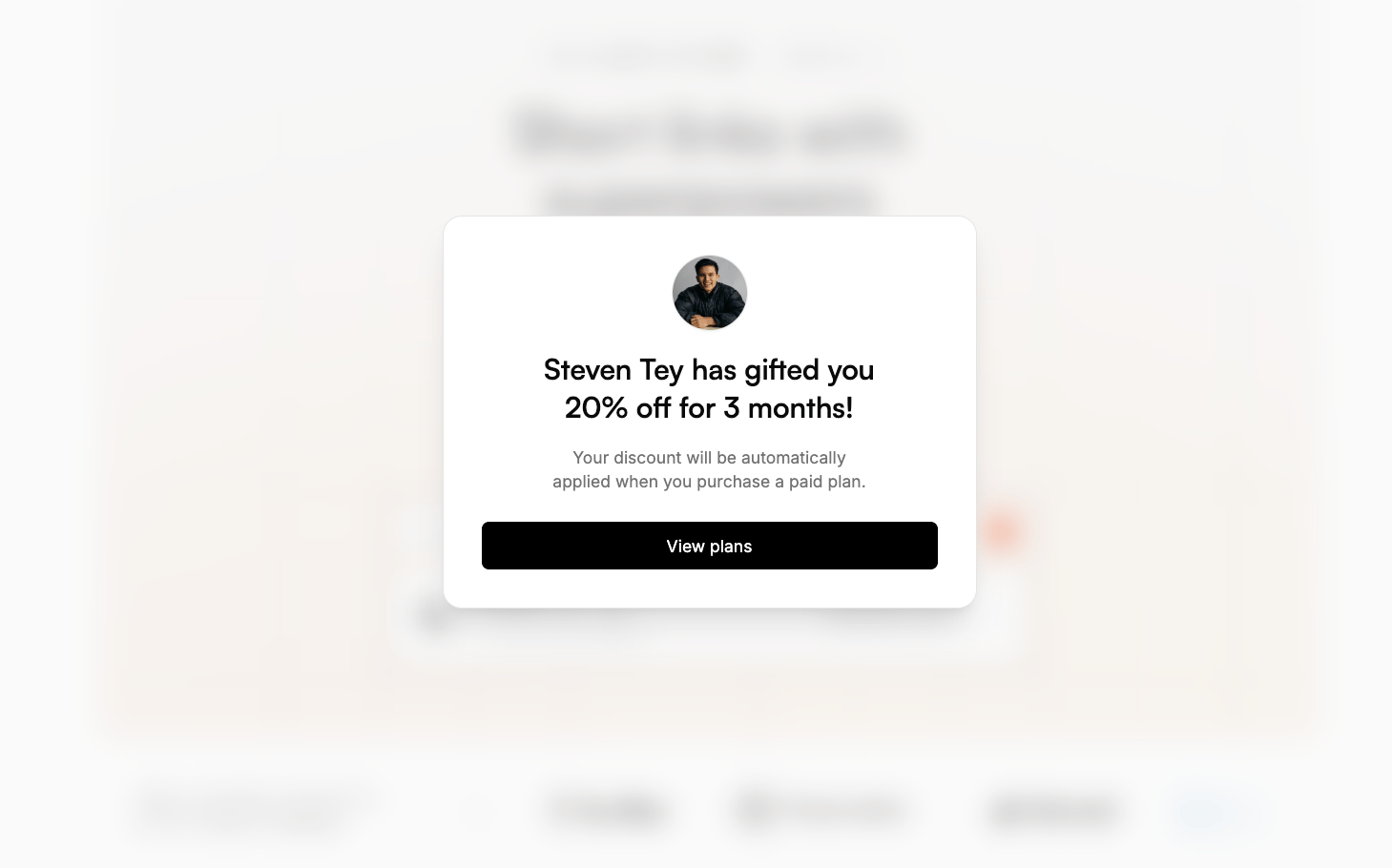
Here is a quick example of how you can display a discount banner using the `useAnalytics()` hook:
<CodeGroup>
  ```javascript HTML theme={null}
  // Display a banner that says: _"John referred you to Acme and gave you 25% off"_
  dubAnalytics("ready", function () {
    if (DubAnalytics.partner && DubAnalytics.discount) {
      const banner = document.createElement("div");

      banner.innerHTML = `
        <div class="flex items-center gap-2">
          <img src="${DubAnalytics.partner.image}" alt="${DubAnalytics.partner.name}" class="size-6 rounded-full" />
          <p>${DubAnalytics.partner.name} referred you to Acme and gave you ${DubAnalytics.discount.amount} ${DubAnalytics.discount.type} off</p>
        </div>
      `;
      document.body.appendChild(banner);
    }
  });
  ```

  ```typescript React/Next.js theme={null}
  // Display a banner that says: _"John referred you to Acme and gave you 25% off"_
  import { useAnalytics } from "@dub/analytics/react";

  function DiscountBanner() {
    const { partner, discount } = useAnalytics();

    if (!partner || !discount) {
      return null;
    }

    return (
      <div className="flex items-center gap-2">
        <img
          src={partner.image}
          alt={partner.name}
          className="size-6 rounded-full"
        />
        <p>
          {partner.name} referred you to Acme and gave you {discount.amount}{" "}
          {discount.type} off
        </p>
      </div>
    );
  }
  ```
</CodeGroup>

Here's an example of how the discount banner will look like:

<Frame>
  <img src="https://mintcdn.com/dub-stripe-first-time-order-setting/hs5LpEZfIchIFc-Q/images/dub-partner-data.png?fit=max&auto=format&n=hs5LpEZfIchIFc-Q&q=85&s=96bdacac6c7df8403c8f9f9b3821adc7" alt="A screenshot of the Dub partner data example" width="1459" height="910" data-path="images/dub-partner-data.png" />
</Frame>